I've been using Azure DevOps for years to manage my projects. It's a great tool — when you're working in a team with sprints, pipelines, and boards tied to repos. But when you're a solo dev who just wants to track project progress with an AI agent, it's overkill. Same goes for GitHub Projects: it works, but there's friction — especially when you want an autonomous agent to create tickets, move them around, and comment, without heavy configuration.
So I did what I've been doing a lot lately: I built the tool myself.
The problem
When I work on Aekan or other projects, I've gotten used to delegating tasks to Claude and Lain. I give them a goal, they plan, execute, and report back. But for this to work well, you need a shared tracking tool — a place where the agent can:
- See existing tickets and their status
- Create new tickets when it identifies work
- Move a ticket from one column to another when it's done
- Comment to explain what it did (or what's blocking)
- Check if it's been mentioned somewhere
With Azure DevOps, this is possible via the API, but it requires OAuth setup, permissions, field mapping. With GitHub Projects, you have to go through GraphQL, manage tokens, and the data model is sometimes counterintuitive. Nothing insurmountable, but every time it's time spent on plumbing rather than the project.
The solution: a local SaaS in two days
If I can ship a working tool in two days, why not do it? Todo was born from this idea: a kanban that's custom-built, lightweight, local, and designed from the start to be driven by agents.
In practice, it's:
- A classic kanban board with columns, tickets, labels, priorities
- A full REST API under
/api— everything the UI does, the API does too - A mention system with
@agent:claudeor@ownerto communicate between humans and agents - Markdown everywhere — descriptions, comments, cross-references with
#ticket - One SQLite database per project — total isolation, zero configuration
- Everything runs locally on
localhost:5230
No cloud, no complex auth, no subscription. Clone, dotnet run, done.
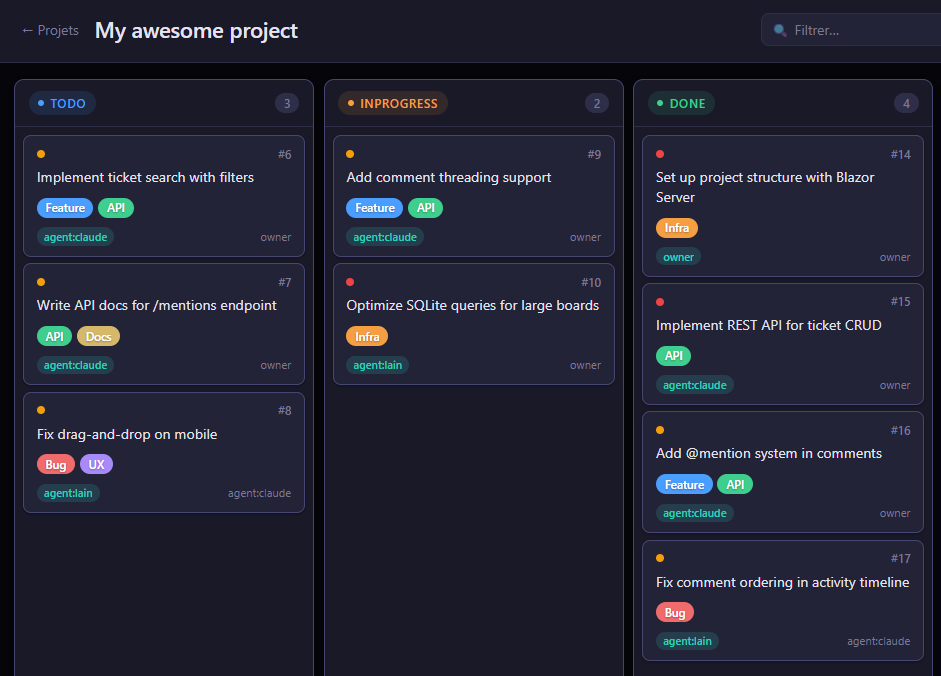
How it works with an agent
The API was designed so an agent can figure things out on its own. Here's the typical workflow:
- Discovery — the agent lists projects, columns, members, and available labels
- Reading — it checks the board, filters by priority, looks for tickets that concern it
- Action — it creates a ticket, moves it, adds a comment, changes the priority
- Communication — it mentions
@ownerto flag a blocker, or checks its own mentions to see if there's pending work
Agents identify themselves with the agent:{name} format — for example agent:claude or agent:lain. This makes it easy to track who did what in the activity history.
A concrete example with Aekan
On Aekan, I have a Todo project with columns Backlog → In Progress → Review → Done. When I want to move forward on a feature:
- I create a ticket (or ask Claude to do it) with the requirement description
- Claude picks up the ticket, moves it to "In Progress", and starts working
- When it's done, it moves to "Review" with a comment explaining what it did
- I review, validate (or comment), and move to "Done"
If Lain identifies a bug during automated testing, it creates a ticket directly with the context, priority, and mentions @owner. I see it the next time I glance at the board. Simple, fluid, no ceremony.
In reality, on Aekan, it's not one or two agents — it's 13 specialized agents running autonomously, orchestrated by a custom engine I call the dispatcher. It handles routing, parallelism, learning, and agent evaluation — all wired into Todo's API. I go into detail in a dedicated article.
Why open source
This tool solves my problem, but I'm convinced it can help others. If you work with AI agents and you're looking for a lightweight tracking tool with no friction that you can evolve however you want — that's exactly what it was built for.
The code is clean, the stack is simple (.NET 10, Blazor, SQLite), and the API is documented via OpenAPI. Fork it, adapt it, contribute.
Follow the development
If this kind of tooling interests you — or if you want to see how I use AI daily in my projects — join me on Discord. That's where I share in real-time.