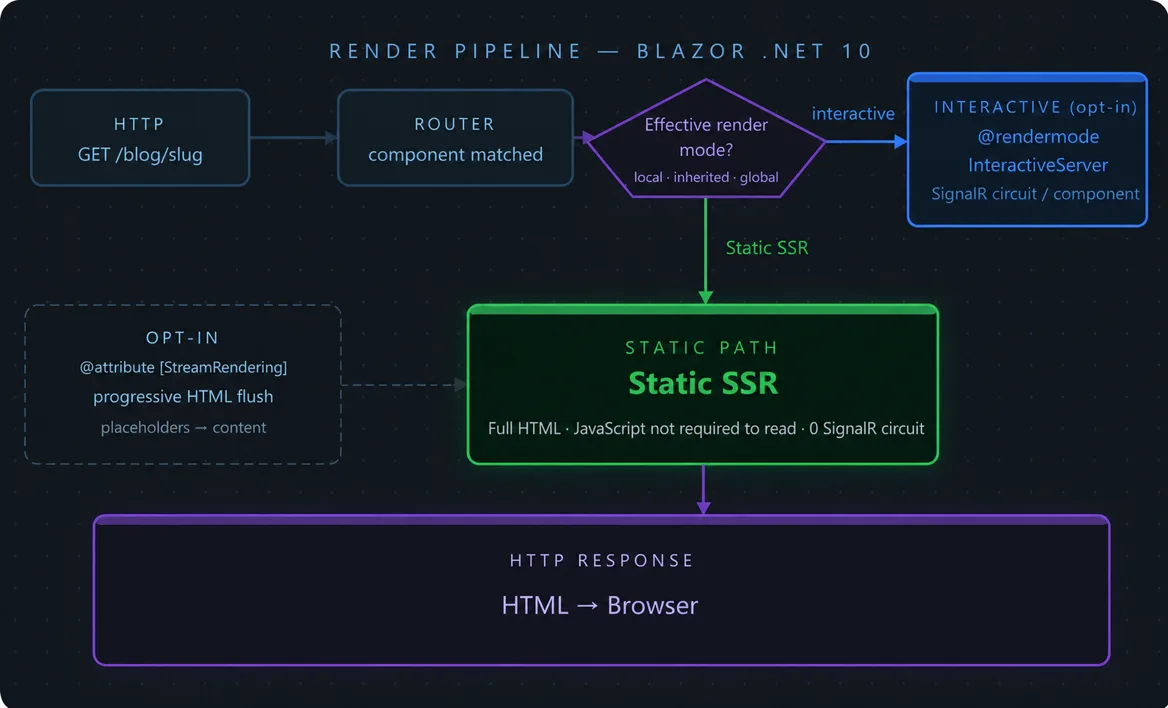
The Problem With Blazor Articles
Most articles about Blazor .NET 10 look like this: a list of new features copy-pasted from the release notes, a few code snippets with no context, and an enthusiastic conclusion along the lines of "Blazor has never been better!"
That's not what you'll find here.
Ekioo.com runs on Blazor Server + .NET 10 in production. Not a demo project, not a tutorial: a real site with bilingual content, a blog, a sitemap, project pages, and SEO requirements. This article is a field report on what I've actually observed — what changed, what got better, and what still costs you something.
The .NET 10 Render Pipeline: What Actually Moved
Before: Three Modes, Three Models
Up through .NET 8, Blazor had three distinct and mutually exclusive render modes:
- Blazor Server: the DOM is managed server-side, interactions travel over SignalR.
- Blazor WebAssembly: the entire runtime is downloaded to the browser, no server at runtime.
- Blazor SSR (static): server-side HTML on first load, no interactivity afterwards.
.NET 8 introduced render modes — the idea that a single project can mix these modes at component granularity. One component can be @rendermode InteractiveServer (SignalR), another @rendermode InteractiveWebAssembly, another purely static. Elegant on paper. Treacherous in practice.
.NET 9: Stabilization, Not Revolution
.NET 9 mostly fixed the friction introduced by .NET 8. The render mode system became more predictable, hydration errors less frequent, streaming SSR behavior more stable. It's the version where Blazor SSR went from "promising but fragile" to "seriously usable."
.NET 10: Static Rendering Becomes First Class
What changes in .NET 10 is that static rendering (Static SSR) becomes the reference mode. The default templates generate SSR-first applications. Interactivity is opt-in, localized, component by component.
Concretely:
- Pages are rendered as static SSR by default — complete HTML sent to the client, no JavaScript required.
- Components that need interactivity explicitly declare their render mode.
- The SignalR circuit is opened only where necessary, not globally for the whole application.
For a site like ekioo.com — mostly static content, a handful of isolated interactions — this is the model that makes sense. And it's the model that .NET 10 stops treating as a special case.
Interactive Blazor SSR: The Component Model That Changed
What "Interactive" Means Now
Before .NET 8, "Blazor Server" meant that the entire component lifecycle went through SignalR. OnInitializedAsync, OnParametersSetAsync, event handlers — everything traveled over the wire. That came at a cost: latency, server resources, network fragility.
In .NET 10, the lifecycle for static components is much simpler: they live for the duration of a render, on the server, then disappear. No server-side state, no open circuit. The page is rendered, the HTML is sent, done.
When you add @rendermode InteractiveServer to a component, you're explicitly opting into the SignalR model for that component only. The rest of the page stays static.
The Pitfalls of Mixing Static and Interactive
This hybrid model is powerful but requires discipline.
Pitfall 1: complex parameters don't cross the boundary
A static component cannot pass a complex C# object to an interactive component. The static/interactive boundary is serialized — you can only pass primitive types or JSON-serializable types. If you try to pass an IEnumerable<MyComplexType> from a static parent to an interactive child, it won't compile or will fail at runtime.
The solution: pass IDs or keys, and let the interactive component fetch the data itself.
Pitfall 2: services aren't shared the same way
In interactive mode, Scoped services are tied to the SignalR circuit — they survive intra-SPA navigation. In static mode, they're tied to the HTTP request — recreated on every navigation. If you have a service maintaining user state in memory, its behavior changes drastically depending on the render mode.
For ekioo.com, I simplified: no in-memory state, everything recalculated from markdown files on each request. A deliberate choice to avoid this class of bugs.
Pitfall 3: prerendering by default
In InteractiveServer mode, Blazor performs a static prerender before establishing the SignalR circuit. That means OnInitializedAsync runs twice: once server-side (static render), once when the circuit opens (interactive render). If you're making HTTP calls in OnInitializedAsync, they double.
The fix: check !FirstRender or use OnAfterRenderAsync(bool firstRender) for operations that should only run once.
Streaming Rendering: Real Behavior and Use Cases
What Streaming SSR Actually Does
Streaming rendering (enabled with @attribute [StreamRendering]) lets Blazor send HTML progressively as components render, without waiting for the whole page to be ready.
Concretely: if a component is loading slow data (a database query, an API call), Blazor can send the rest of the page immediately and "stream" that component's content when its data becomes available.
From the browser's perspective: the page starts displaying very quickly, with placeholders for pending parts, then the final content replaces the placeholders with no visible reload.
Use Cases on ekioo.com
On ekioo.com, the blog lists articles from markdown files on disk. That's fast — no need for streaming. But if I had a "recent posts" section with data from a third-party API (variable latency), streaming would be relevant: I could display the rest of the page instantly and let that section load at its own pace.
Pitfalls to Know
Streaming SSR changes how CSS selectors and JavaScript initialized on load interact with the DOM. If you have scripts that run on DOMContentLoaded and look for DOM elements, they may run before streamed elements are available.
On ekioo.com, the particle animation is initialized via a classic script — I had to make sure it attaches to the page's canvas and not to elements that might arrive via streaming later.
Another point: SEO tools and crawlers increasingly understand streaming (Googlebot has supported JavaScript rendering for a long time), but classic audit tools may see incomplete content if they don't handle chunked responses.
Static SSR and SEO: What It Really Changes
The Core Problem: Blazor SPA and Googlebot
Classic Blazor WebAssembly was a serious SEO problem. Googlebot receives an empty HTML shell, waits for WebAssembly to load (variable timeout), and indexes potentially incomplete or delayed content. Not ideal.
Blazor Server partially avoided this — prerender sent complete HTML on the first load. But the server-side render time and establishing the SignalR circuit added latency, and Core Web Vitals metrics suffered.
Static SSR: Complete HTML, Zero JavaScript Required
With pure Static SSR, the server generates complete HTML and sends it directly. No JavaScript needed to see the content. Googlebot receives exactly what the user sees. It's the behavior of a PHP site or a static site generator — but with the productivity of C# and the Razor component model.
For ekioo.com, here's what that looks like in practice:
Time to First Byte (TTFB): on a modest VPS (2 vCPU, 4 GB RAM), static pages serve in < 50 ms after warm-up. The cold start (dotnet process startup) is the only notable latency, but it's a one-shot.
Largest Contentful Paint (LCP): without JavaScript blocking the render, the LCP is the main content — not a spinner or an empty skeleton. On ekioo.com's blog pages, the LCP is the article title, visible as soon as the HTML arrives.
Cumulative Layout Shift (CLS): streaming SSR can introduce CLS if placeholders have different dimensions than the final content. With pure Static SSR (no streaming), this risk doesn't exist: the layout is fixed from the first byte.
The Sitemap as an Authority Signal
Ekioo.com exposes two sitemaps: /sitemap.xml (FR + EN) and /sitemap-content.xml (raw markdown). The lastmod dates are pulled directly from the YAML frontmatter of the markdown files.
This isn't decoration: Googlebot uses lastmod to prioritize recrawling. An incorrect date (too old or too recent) blurs that signal. With Blazor SSR, I generate these dates dynamically from files on disk — no possible mismatch between the actual content and what the sitemap declares.
A Concrete Example: Bilingual Navigation on ekioo.com
A case that illustrates the SSR model's constraints well:
Ekioo.com is bilingual (FR/EN). Language detection happens only from the URL — no cookie, no Accept-Language header, no automatic redirect. A deliberate SEO decision: Google recommends distinct URLs per language, not redirects based on geolocation.
Each Razor page declares two routes:
@page "/blog/{Slug}"
@page "/en/blog/{Slug}"
And a cascading parameter passes the language to all child components:
[CascadingParameter] public Lang Lang { get; set; }
This pattern works perfectly with Static SSR. There's no navigation state to maintain between pages — each URL is an independent request, served by the right component with the right language.
With classic Blazor Server (global interactive mode), this type of navigation could create inconsistencies: the language could "stick" from the previous page if the SignalR circuit remained open and the state wasn't properly reset. With pure SSR, this problem doesn't exist structurally.
Verdict: Who Should Use .NET 10 + Blazor SSR in 2026
It's the right choice if:
- You're building a mostly static site (blog, portfolio, documentation, corporate site) with localized interactivity (contact form, search component, shopping cart).
- You work in C# and want to avoid context-switching between a .NET backend and a React/Vue/Angular frontend.
- SEO is critical — you want crawlers to see exactly what users see, without depending on JavaScript rendering.
- You're targeting solid Core Web Vitals performance without a CDN and without complex infrastructure.
It's not the right choice if:
- You're building a highly interactive application (real-time dashboard, collaborative editor, tool with lots of local state) — in that case, a React SPA with an API backend will be more natural.
- Your team is primarily JavaScript — the learning cost of Blazor is non-trivial.
- You need a very large number of simultaneous stateful interactive connections — SignalR circuits have a memory cost per connection that static SSR doesn't.
The ekioo.com case is representative: static content, bilingual, SEO-critical, solo C# team. Blazor SSR .NET 10 is the natural fit. Productivity is excellent — I built the site in two days with Claude, and the Razor component model is expressive enough to cover all the requirements.
What convinced me wasn't the novelty — it's the coherence. .NET 10 has made the SSR-first model predictable and opinionated. It's no longer an experimental mode you hack together to look like Next.js. It's a clear architectural stance: static rendering by default, interactivity by exception, performance without compromise.
It's a choice I wish I could have made three years ago.